Have you ever hit “send” on an important email… only to see a huge typo a second later? It feels terrible… right? We have all been there. Writing can be really hard. You have to worry about spelling… commas… and if you even sound like a real person.
In 2026, you do not have to do this alone. AI English grammar checker tools are like having a smart friend looking over your shoulder. These tools are much smarter than the old spell-check on your computer. They understand your “tone.” They know if you are being too bossy or too shy.
Using the best AI English grammar checker tools can save you so much time. Some people say they save two hours every week! Whether you are a student, a blogger, or a business owner, these tools make your life easier.
Let’s look at the 5 best tools you can use right now…
1. Grammarly — The All-Round King
Grammarly is the big name everyone knows. And for a good reason! It is very easy to use. It works almost everywhere… like in your browser, on your phone, and even in your emails.
Why people love it: Grammarly does not just fix “teh” to “the.” It looks at the whole sentence. It can tell you if a sentence is too long or “clunky”. It also has a “tone detector.” This tells you if you sound professional, friendly, or even angry.
The Good Parts:
- It works in real-time while you type.
- The free version is actually very helpful for basic mistakes.
- It has a great mobile keyboard.
The Not-So-Good Parts:
- Sometimes it tries too hard. It might suggest “fixes” that change your personal style.
- The best features, like full-sentence rewrites, are locked behind a paid plan.
Best for: Everyday writing, emails, and LinkedIn posts.
2. QuillBot — The King of Accuracy
QuillBot used to just be for “paraphrasing” (that means changing the words but keeping the meaning). But in 2026, it is one of the best English grammar checker tools out there.
Why people love it: In big tests, QuillBot often catches more errors than other tools. It is very fast. It also has a “Fix All Errors” button. This lets you clean up a whole page with just one click!
The Good Parts:
- It is very accurate for technical grammar rules.
- The free version is not “limited” on purpose like other tools.
- It helps you rewrite sentences if they sound “stiff”.
The Not-So-Good Parts:
- It does not have a browser extension that works in every single app yet.
- It might miss some deep “context” errors that Grammarly catches.
Best for: Students who need to fix essays and anyone who needs to rewrite awkward sentences.
3. ProWritingAid — The Writer’s Coach
If you are writing a long book or a big report, ProWritingAid is your best bet. It does not just fix errors… it teaches you how to be a better writer.
Why people love it: This tool gives you over 25 different “reports”. It looks at things like how many times you use the same word. It checks if your “pacing” is good. It is like having a real editor sitting next to you.
The Good Parts:
- Great for long documents and fiction stories.
- It looks at the “big picture,” not just small typos.
- You can set your own “style guide” to keep your brand consistent.
The Not-So-Good Parts:
- The interface can look a bit “busy” or scary for beginners.
- The free version is limited to 500 words at a time.
Best for: Authors, bloggers, and people who write long reports.
4. LanguageTool — The Multilingual Star
Do you speak more than one language? If yes… you need LanguageTool. It is an “open-source” tool that works in over 30 languages, including Spanish, French, and German.
Why people love it: Most tools only care about English. But LanguageTool knows that the world is big. It even knows different types of English. You can tell it you are writing for people in the UK, Australia, or the USA.
The Good Parts:
- Supports 30+ languages for free.
- No sign-up is needed to use the website version.
- It has a “Picky Mode” for very deep checks.
The Not-So-Good Parts:
- The English checks are sometimes not as “smart” as Grammarly.
- The free version does not always work inside other apps like Word.
Best for: Non-native speakers and people writing in multiple languages.
5. Hemingway Editor — The Clarity Master
This tool is a bit different. It does not just look for grammar. It looks for “readability.” It wants to make your writing bold and clear.
Why people love it: Hemingway uses colors to show you problems. Red means a sentence is too hard to read. Yellow means it is a bit long. It tells you to stop using big words when small ones will do.
The Good Parts:
- The cleanest and simplest look of all the tools.
- It stops you from being “wordy”.
- Great for making sure a 10th-grade student can read your work!
The Not-So-Good Parts:
- It does not “fix” the errors for you automatically.
- It is not a full “grammar” tool—it is more of a “style” tool.
Best for: Bloggers and people who want to write simply and clearly.
How to Choose the Best Tool for You?
Choosing can be tough… because all these tools are good! Here is a quick guide to help you decide:
- Need something fast for work? Go with Grammarly.
- Writing an essay for school? QuillBot is amazing.
- Writing a novel or a book? ProWritingAid is the one.
- Bilingual or writing in Spanish? Use LanguageTool.
- Want to make your writing “punchy”? Try Hemingway.
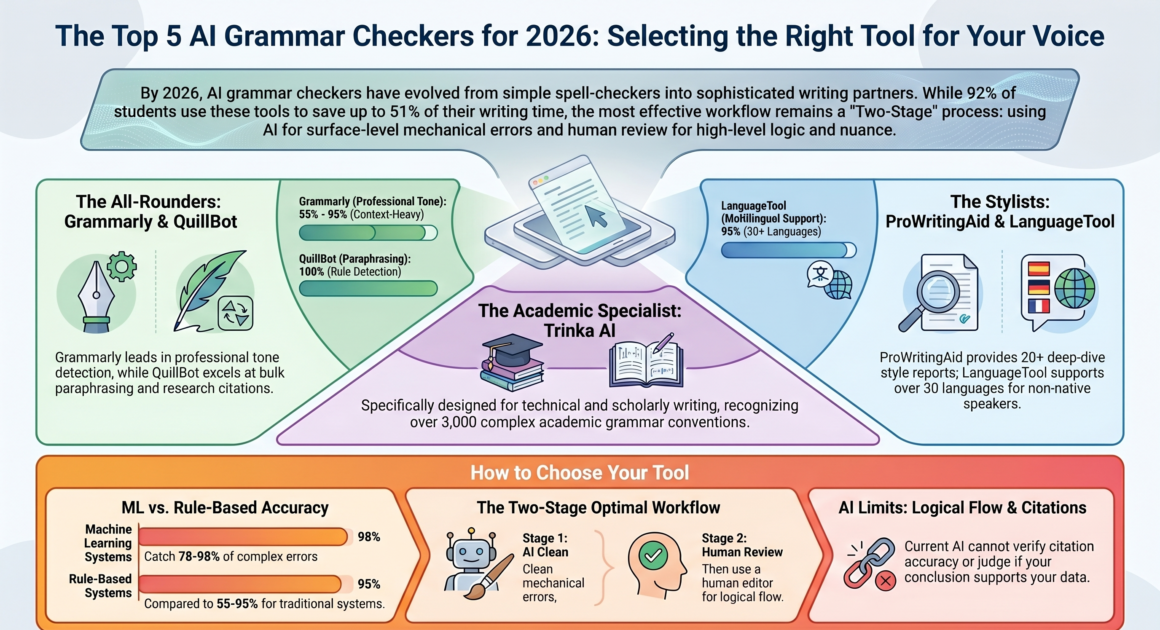
Many experts say the best way is to use a “mix”. You can use Grammarly to fix the small typos. Then… run it through Hemingway to make sure it is easy to read. This gives you the best of both worlds!
Are AI Tools Better Than Humans?
This is a big question in 2026. AI is very fast and cheap. It can catch a missing comma in a split second. But AI does not “feel” your story.
A human editor can tell if your argument is weak. They know if your joke is actually funny… or just weird. The best “pro” workflow is this:
- AI First: Use a tool to clean up the “messy” typos.
- Human Last: Read it yourself (or hire an editor) to check the meaning and flow.
This way… you get the speed of AI and the “heart” of a human.
A Few Tips to Get the Most Out of Your Tools
- Don’t click “Accept All”: AI makes mistakes too! Always read the suggestion before you click.
- Read the “Why”: Most tools explain the rule. If you read the explanation, you will actually get better at English over time.
- Check your “Voice”: If the AI makes you sound like a robot… ignore it. Your unique voice is what people want to read.