You have 3 seconds. That is roughly the amount of time your recipient spends looking at your name and subject line before deciding whether to open your email or send it straight to the trash folder. In a world where the average office worker receives over 120 emails per day, standing out in a crowded inbox isn’t just a nice-to-have—it is a necessity.
Whether you are a student emailing a professor about a deadline extension, a teacher contacting a parent, or a professional pitching a new client, the rules for writing an email can make or break your communication. A poorly written email can confuse your reader, damage your reputation, or even cost you an opportunity. A well-crafted one, however, builds trust, conveys competence, and gets you the response you need.
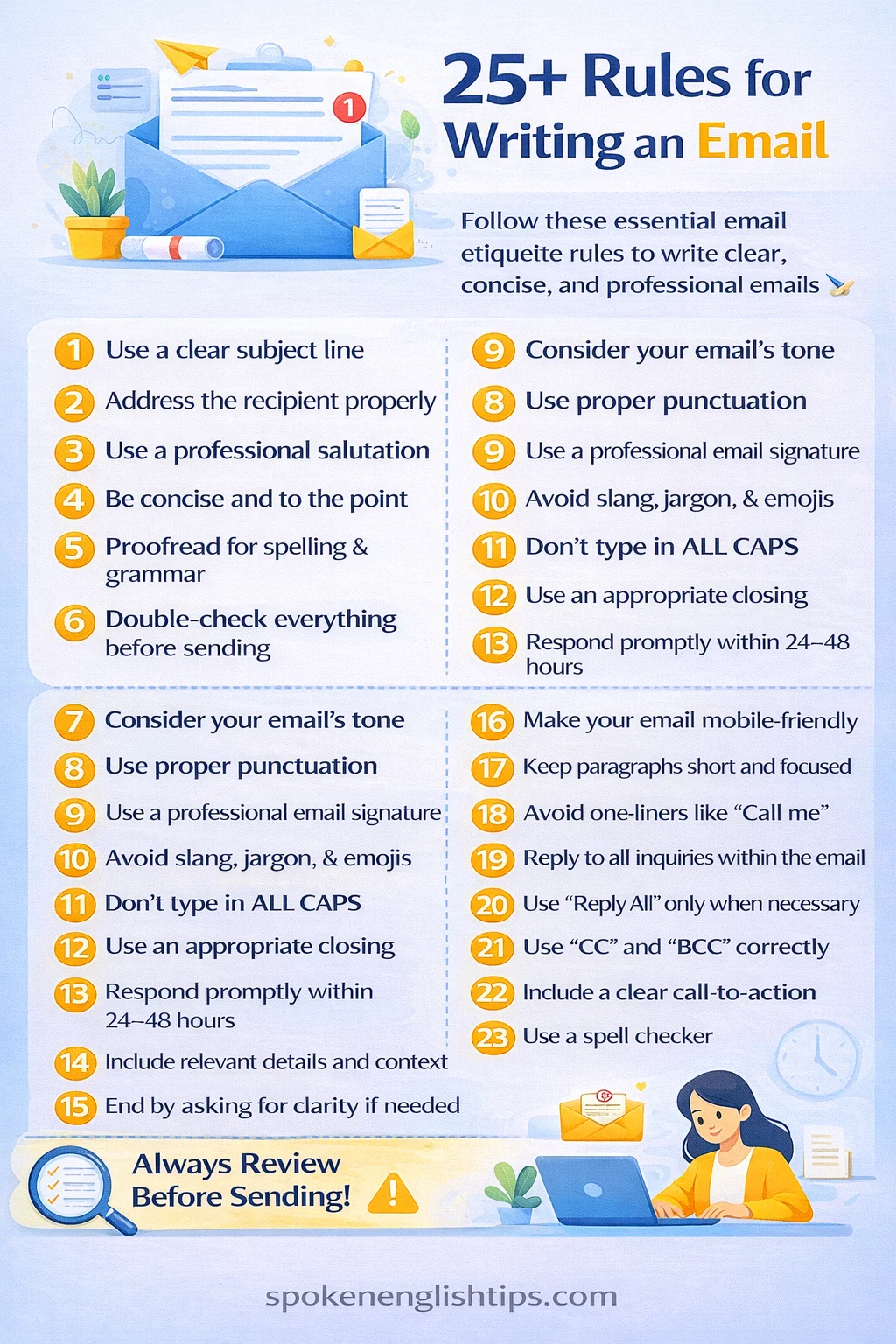
In this comprehensive guide, we will break down 25+ essential rules for writing an email, provide you with ready-to-copy templates, and ensure you never hit “send” on a bad email again.
What Are the Rules for Writing an Email?
Email writing rules are the standardized guidelines and best practices that govern how we compose digital messages. Unlike casual text messages, emails—especially in academic and professional settings—require a specific structure, tone, and level of polish.
When Do You Use These Rules?
You should adhere to strict email etiquette in the following scenarios:
- Academic Communication: Emailing professors, deans, or university administration.
- Job Applications: Sending cover letters and resumes.
- Workplace Correspondence: Communicating with colleagues, managers, or clients.
- Customer Service: Reaching out to support teams or handling complaints.
Why Is It Important?
Following proper email format rules demonstrates professionalism and respect for the recipient’s time. It minimizes the back-and-forth of clarifying questions and ensures your message is understood exactly as you intended.
Step-by-Step Guide to Writing the Perfect Email
Before we dive into the list of rules, let’s look at the anatomy of an email. Here is the step-by-step process for composing a message that gets results.
Step 1: The Subject Line (The Hook)
Your subject line is the first thing people see. If it is vague, they might delete it immediately. The rules for email subject lines dictate that they should be clear, concise, and informative.
- Bad: “Hello” or “Question”
- Good: “Question regarding EN101 Research Paper Due Date”
Step 2: The Salutation (The Greeting)
Always open with a polite greeting. Never launch straight into the text. Professional email greetings set the tone for the rest of the message.
- Formal: “Dear Professor Smith,”
- Semi-formal: “Hello Dr. Jones,” or “Hi Mark,”
Step 3: The Body (The Message)
Get straight to the point. Use the “Inverted Pyramid” method: start with the most important information, then add context.
- Introduce yourself if necessary (e.g., “I am a student in your Monday 10 AM class…”).
- State your purpose clearly (e.g., “I am writing to request an extension on…”).
- Add details (e.g., “Due to a medical emergency…”).
Step 4: The Call to Action (The Ask)
What do you want them to do? Be explicit. If you need a reply, a document, or a meeting, ask for it clearly.
- Vague: “Let me know what you think.”
- Clear: “Could you please confirm if Friday at 2 PM works for you?”
Step 5: The Closing (The Sign-off)
End with a professional closing followed by your name.
- Formal: “Sincerely,” or “Respectfully,”
- Common: “Best regards,” or “Thank you,”
Step 6: The Signature (The Details)
Always include a professional email signature with your full name, title/role, and contact information. This saves the recipient from having to look up who you are.
Proper Email Format: Key Sections Explained
To master the rules for writing an email, you must understand the structural hierarchy.
The Anatomy of a Professional Email
1. The “To” Field
Double-check this before you hit send. Nothing is more embarrassing (or dangerous) than sending a complaint about your boss… to your boss.
2. The Subject Line
Keep it under 50 characters if possible. It should act as a mini-headline for the content inside.
3. The Opening Line
The first sentence should acknowledge the context. If this is a reply to a thread, reference the last conversation.
- Example: “Thank you for your prompt response regarding the scholarship application.”
4. The Body Paragraphs
Keep paragraphs short. In the digital age, walls of text are intimidating. Use white space generously. Following email structure rules means making it easy to scan.
5. The Closing Line
Summarize your request and thank them for their time.
- Example: “Thank you for your consideration. I look forward to hearing from you soon.”
Proper Email Format: Key Sections Explained
To master the rules for writing an email, you must understand the structural hierarchy.
The Anatomy of a Professional Email
H3: 1. The “To” Field
Double-check this before you hit send. Nothing is more embarrassing (or dangerous) than sending a complaint about your boss… to your boss.
2. The Subject Line
Keep it under 50 characters if possible. It should act as a mini-headline for the content inside.
3. The Opening Line
The first sentence should acknowledge the context. If this is a reply to a thread, reference the last conversation.
- Example: “Thank you for your prompt response regarding the scholarship application.”
4. The Body Paragraphs
Keep paragraphs short. In the digital age, walls of text are intimidating. Use white space generously. Following email structure rules means making it easy to scan.
5. The Closing Line
Summarize your request and thank them for their time.
- Example: “Thank you for your consideration. I look forward to hearing from you soon.”
Ready-to-Copy Email Samples
To help you apply these rules for writing an email, here are five specific templates you can copy and adapt.
Sample 1: Short Version (Quick Question)
Subject: Quick Question about EN101 Syllabus
To: Professor Smith
Dear Professor Smith,
I hope you are having a good week. I am a student in your EN101 class on Tuesdays at 10 AM. I have a quick question regarding the syllabus: Could you clarify if the reading response for this week is due on Friday or Monday?
Thank you for your time.
Best regards,
Jane Doe
Student ID: 12345
Sample 2: Professional Version (Job Application)
Subject: Application for Marketing Internship – Jane Doe
To: hiring@company.com
Dear Hiring Manager,
I am writing to express my enthusiastic interest in the Marketing Internship position listed on LinkedIn. As a current junior studying Communications at State University with a passion for digital content, I believe my skills align perfectly with your team’s needs.
During my time at university, I have managed the student government’s social media accounts, increasing engagement by 40% over six months. I have attached my resume and a portfolio of my work for your review.
I would welcome the opportunity to discuss how my background in content creation can contribute to the success of [Company Name]. Thank you for your time and consideration.
Sincerely,
Jane Doe
jane.doe@email.com | (555) 123-4567
LinkedIn: linkedin.com/in/krishnasahaniofficial
Sample 3: Email to a Professor (Requesting an Extension)
Subject: Extension Request for POL101 Essay – John Smith
To: Professor Anderson
Dear Professor Anderson,
I hope this email finds you well. I am a student in your POL101 class (Wednesday 2 PM section).
I am writing to respectfully request a 48-hour extension for the upcoming research paper, which is currently due this Friday. Due to a family emergency this week, I have been unable to dedicate the necessary time to research to ensure the quality of work I want to submit.
I understand this is a disruption to your grading schedule. If granted, I would submit the paper by Sunday evening. I am happy to provide any documentation if needed.
Thank you for your understanding and consideration.
Respectfully,
John Smith
Student ID: 67890
Sample 4: Professional Business Version (Client Follow-up)
Subject: Following up on our meeting – Project Proposal
To: client@business.com
Dear Mr. Johnson,
It was a pleasure speaking with you yesterday regarding the upcoming website redesign project.
As promised, I have attached the detailed proposal and timeline for your review. Based on our conversation, I have prioritized mobile responsiveness and SEO optimization in the initial phase.
Please let me know if you have any questions about the scope of work or the budget outlined in Section 3. I am available for a call next Tuesday or Wednesday to discuss next steps.
Best regards,
Mark Williams
Project Manager, Design Co.
mark.w@designco.com | (555) 987-6543
Sample 5: Teacher to Parent Email
Subject: Update on Jamie’s Progress – Math 101
To: parent@email.com
Dear Mrs. Smith,
I hope you are having a nice week. I am writing to give you a quick update on Jamie’s progress in my Math 101 class.
Jamie is a wonderful student and participates actively in class discussions. However, I have noticed that he has struggled slightly with the recent unit on algebra. I wanted to reach out early to ensure he has the support he needs.
I have attached a few practice worksheets that might be helpful. Would it be possible to schedule a quick 10-minute call next week to discuss how we can work together to support him?
Best regards,
Ms. Davis
Math Teacher, Grade 8
Springfield School
Sample 6: Networking Request (LinkedIn/Email)
Subject: Advice regarding a career in Finance
To: contact@email.com
Dear Ms. Lee,
My name is Alex Chen, and I am a recent graduate of City University with a degree in Finance. I have been following your work at [Company Name] with great interest, particularly your insights on investment strategy.
I am writing to ask if you would be open to a brief 15-minute informational interview. I would love to learn more about your career path and hear any advice you might have for someone just starting out in the industry.
I understand you are very busy, so even a few sentences via email would be incredibly helpful.
Thank you for your consideration.
Sincerely,
Alex Chen
alex.chen@email.com
Sample 7: Inquiry/Information Request
Subject: Inquiry about Scholarship Application Status
To: admissions@university.edu
Dear Office of Admissions,
I hope this message finds you well. I submitted my application for the Future Leaders Scholarship on March 1st, and I wanted to check on the status of my application.
Could you please confirm if my file is complete and if there are any missing documents on my end? I want to ensure everything is in order before the review process begins.
Thank you for your hard work during this busy admissions season.
Best regards,
Taylor Johnson
Applicant ID: A98765
Mistakes to Avoid in Email Writing
Even when you know the rules for writing an email, it is easy to slip into bad habits. Here are the common pitfalls to watch out for:
- The “Reply-All” Disaster: Accidentally replying to a massive mailing list with a personal comment.
- The Forgetting Attachments: Mentioning an attachment without including it. This looks unprofessional and requires a follow-up “Oops” email.
- Vague Subject Lines: Using “Hi” or leaving the subject blank ensures your email will likely be ignored.
- Overusing High Priority Flags: Marking every email as “URGENT” desensitizes the reader. Save it for real emergencies.
- Emotional Sending: Never send an email when you are angry. You can’t unsend it (in most cases).
- Assuming Tone: Without emojis or vocal inflection, jokes often fall flat.
Tips to Make Your Email Stronger
To elevate your emails from “good” to “great,” consider these advanced email writing tips:
- Use the “Principle of Charity”: Assume the best intentions when reading replies, and write your emails so they cannot be misinterpreted.
- Front-Load the Action: Put the action item or request in the first paragraph. Don’t bury it at the bottom.
- Use a Signature Generator: Ensure your signature is visually clean and includes links to your professional social profiles.
- Create Templates: Save templates for common emails (like the samples above). This saves time and ensures consistency.
- Read it Backwards: To catch typos, read the email from the last sentence to the first. This disrupts your brain’s pattern recognition and helps you spot errors.
Frequently Asked Questions (FAQ)
1. What are the most important rules for writing an email?
The most critical rules include using a clear subject line, addressing the recipient properly, being concise, proofreading for typos, and including a professional signature.
2. How long should a professional email be?
Ideally, keep it between 50 and 125 words. If you need to write more, use bullet points and short paragraphs to make it scannable. Long emails often go unread.
3. What is a good subject line for an email?
A good subject line is specific and includes the purpose and context. For example: “Question regarding Scholarship Application” or “Meeting Request: Project Alpha Discussion.”
4. Should I use emojis in a professional email?
Generally, no. In creative fields or with close colleagues, a smiley face might be acceptable, but when in doubt, leave them out. Following business email rules usually means no emojis.
5. How do I address a professor in an email?
Always use “Professor” or “Dr.” followed by their last name unless they have explicitly invited you to use their first name. For example: “Dear Professor Smith” or “Dear Dr. Jones.”
6. What is the best way to sign off an email?
“Best regards,” “Sincerely,” “Thank you,” and “Respectfully” are all safe and professional options. “Cheers” is acceptable in more casual workplaces.
7. Why is proofreading important in email writing?
Proofreading ensures your message is clear and professional. Typos and grammatical errors can make you seem careless or incompetent, which damages your credibility.
8. Can I use contractions in formal emails?
It depends on the level of formality. In very formal emails (like to a Dean), write “I am” instead of “I’m.” In standard business emails, contractions are generally fine as they sound less robotic.