Searching for work in Australia can be tiring, especially when applications go unanswered. Job search apps can make the process easier by helping you find suitable positions, save searches, and stay organised.
SEEK is our top pick for the best app to find jobs in Australia in 2026. It covers many industries and provides useful tools for searching and tracking applications.
However, it won’t suit everyone. LinkedIn may be better for professional roles, while Sidekicker focuses on casual shifts.
Here are six job search apps worth considering, along with practical tips for using them effectively. Our recommendations reflect each platform’s features and purpose, not independently measured hiring success.
Read Also: Best Apps to Apply for Jobs in Dubai
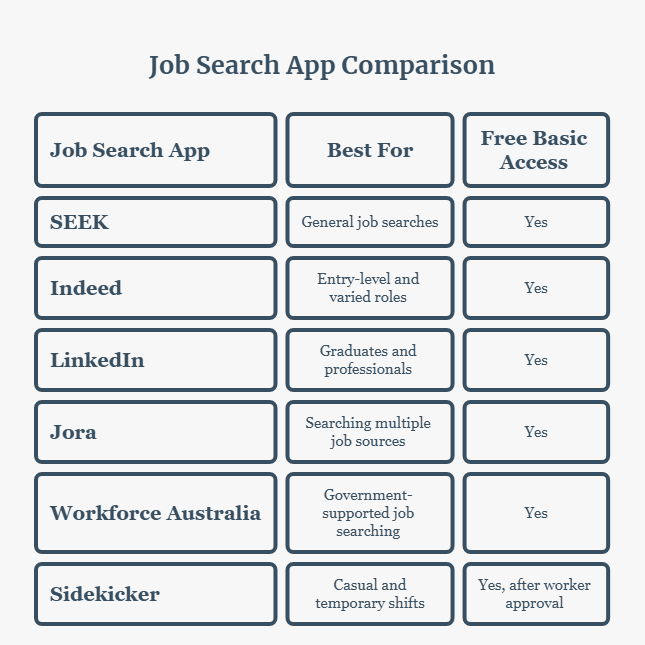
Best Job Search Apps in Australia: Quick Comparison
| Job Search App | Best For | Free Basic Access |
|---|---|---|
| SEEK | General job searches | Yes |
| Indeed | Entry-level and varied roles | Yes |
| Graduates and professionals | Yes | |
| Jora | Searching multiple job sources | Yes |
| Workforce Australia | Government-supported job searching | Yes |
| Sidekicker | Casual and temporary shifts | Yes, after worker approval |
Start with SEEK and one other app that matches your goals instead of checking all six.
1. SEEK: Best Overall Job Search App
SEEK is a strong starting point for full-time, part-time, and graduate work. Its listings cover industries such as retail, administration, healthcare, construction, and technology.
You can filter jobs by location and work type, save searches, receive alerts, and track applications through its mobile app.
Upload your updated resume and search for a specific position, such as “Retail Assistant Sydney.”
Best for: People exploring a broad range of job opportunities.
Keep in mind: Popular positions can be competitive. Tailor your resume to each role.
2. Indeed: Best for Entry-Level and General Jobs
Indeed Australia is useful for people entering the workforce, changing careers, or exploring different industries.
You can search for positions in customer service, hospitality, cleaning, administration, and warehousing.
The app lets you save listings, set job alerts, communicate with employers where supported, and track applications.
Some employers accept applications directly through Indeed, while others direct you to their websites.
Best for: First-time applicants, career changers, and general job seekers.
Keep in mind: Confirm that a vacancy is current and verify the employer before sharing personal information.
3. LinkedIn: Best for Professional Careers
LinkedIn Jobs combines job searching with professional networking.
Recruiters can review your profile, while you can follow companies, create job alerts, and apply for selected positions using Easy Apply.
It’s particularly useful for graduates and applicants in engineering, IT, finance, and management.
An engineering graduate, for example, might search for “Graduate Engineer Brisbane.”
Best for: Graduates, specialists, and experienced professionals.
Keep in mind: Easy Apply isn’t available for every position. Keep your profile accurate and complete, even when applications happen on an employer’s website.
4. Jora: Best for Searching Multiple Job Sources
Jora brings together job advertisements from websites across the internet.
This makes it a useful option when you want to explore vacancies beyond a single job board.
You can filter searches by job title and location, save listings, and sign up for alerts.
Try searching for “Warehouse Assistant Perth” to find relevant opportunities.
Jora
Best for: Applicants who want to explore jobs from multiple sources.
Keep in mind: The same vacancy may appear more than once. Check the original advertisement before applying whenever possible.
5. Workforce Australia: Best Government-Supported Option
Workforce Australia is an Australian Government employment service.
Its job-seeker app supports job searches, applications, and alerts. It also provides resources covering resumes, interviews, and career planning.
You can save suitable jobs and manage searches through your account.
Best for: People seeking free job-search tools and government employment information.
Keep in mind: Access to some employment assistance and account services depends on registration or eligibility requirements.
6. Sidekicker: Best for Casual and Shift-Based Work
Sidekicker works differently from a traditional job board.
It connects approved workers with temporary shifts in hospitality, events, warehousing, and other industries.
After completing the application and screening process, eligible workers can view available shifts, review job details, and apply through the app.
This may suit someone looking for flexible work around study or other commitments.
Best for: Adults seeking temporary or flexible work who meet the platform’s requirements.
Keep in mind: Applicants must be at least 18, and approval isn’t guaranteed. Available shifts depend on your location, skills, documents, and employer demand.
How to Get Better Results From Job Search Apps
Start with a clear resume and search for specific job titles rather than simply typing “jobs in Australia.”
Include a city and employment type, such as “Part-Time Retail Assistant Melbourne,” to narrow your results.
Turn on relevant alerts and review new vacancies regularly.
Before applying, check the responsibilities, required experience, salary information, and location.
Adjust your resume to highlight genuine skills that match the position. Never claim qualifications or experience you don’t have.
Keep a simple record of where you’ve applied, when you applied, and whether you’ve received a reply.
This helps prevent duplicate applications and makes following up easier.
Avoid Job Scams and Check Your Right to Work
Be cautious about unexpected recruitment messages, promises of unusually high earnings, or requests for upfront payments.
Australia’s Scamwatch warns that fake job advertisements can appear even on familiar platforms.
Verify employers through their official websites before providing sensitive information.
Scamwatch
If you hold an Australian visa, check your current conditions and work entitlements through the Department of Home Affairs’ VEVO service.
Overseas applicants should confirm visa and sponsorship requirements rather than assuming an application provides permission to work.
Immigration and citizenship Website
You can also check minimum pay rates and employment entitlements through the Fair Work Ombudsman.
25+ Best Companies in Dubai for Work
If you are planning to go gulf countries like in Dubai then you must read this blog. After reading this blog you will have full idea and trust to find best company for you.
Frequently Asked Questions
Are Australian job search apps free?
The six platforms offer free basic access, although LinkedIn has optional paid features. Sidekicker requires worker approval before you can access shifts, and some Workforce Australia services have eligibility rules.
Which app is best for part-time jobs?
Start with SEEK or Indeed for regular part-time positions. Sidekicker may suit approved workers looking for casual shifts rather than ongoing part-time employment.
Can overseas applicants use these apps?
Yes. You can search and apply from overseas, but eligibility to work depends on the position and your visa status. Not every employer sponsors visas.
Which job app should I use in Sydney or Melbourne?
SEEK is a practical first choice in either city. Add LinkedIn for professional roles, Indeed or Jora for broader searches, or Sidekicker if you qualify for casual shift work.
Final Verdict: Which Job Search App Is Best?
For most people, SEEK is the best app to start a job search in Australia in 2026.
Pair it with another platform suited to your experience and preferred employment type.
Set focused alerts, review listings carefully, and keep track of your applications.
No app guarantees a job, but a focused search can help you find worthwhile opportunities.
Editorial note: These recommendations are based on platform features and intended users, not an independent comparison of job-placement results. Features, eligibility requirements, and job availability may change.