Most IT teams start the same way. A shared spreadsheet, a folder full of email threads, and a good-faith effort to track every ticket, asset, and request manually. For a team of one or two technicians managing a small environment, that arrangement works fine – until it doesn’t.
The transition from spreadsheet-based IT management to a dedicated IT service management (ITSM) platform is rarely dramatic. It tends to happen gradually: a missed ticket here, a conflicted Excel file there, an audit that exposes a gap in your asset records. By the time the problem is obvious, the team is already spending more time maintaining the spreadsheet than resolving issues.
This article examines the Excel vs ITSM question with operational specificity – not just what the tools do differently, but when the gap actually starts to matter, what breaks first, and how to recognize the inflection point before it becomes a crisis.
What Excel Actually Does Well
Excel deserves credit before it receives criticism. For a one-person IT shop managing fewer than 100 devices across a single location, a well-structured spreadsheet is a legitimate tool. It requires no licensing, no implementation timeline, and no configuration. A senior technician can build a usable asset tracker in an afternoon.
The ceiling appears quickly, though. Excel is a calculation and data-entry tool – it was never designed to manage concurrent user access, enforce SLA timers, route requests by category, or maintain an auditable history of who changed what and when. Bending it to do those things requires workarounds that compound over time.
Organizations that use Excel for IT management are not making a mistake, exactly. They’re often making the only practical choice available given their size and budget at that moment. The mistake is staying too long after the environment has outgrown the tool.
Where the Comparison Breaks Down: A Functional View
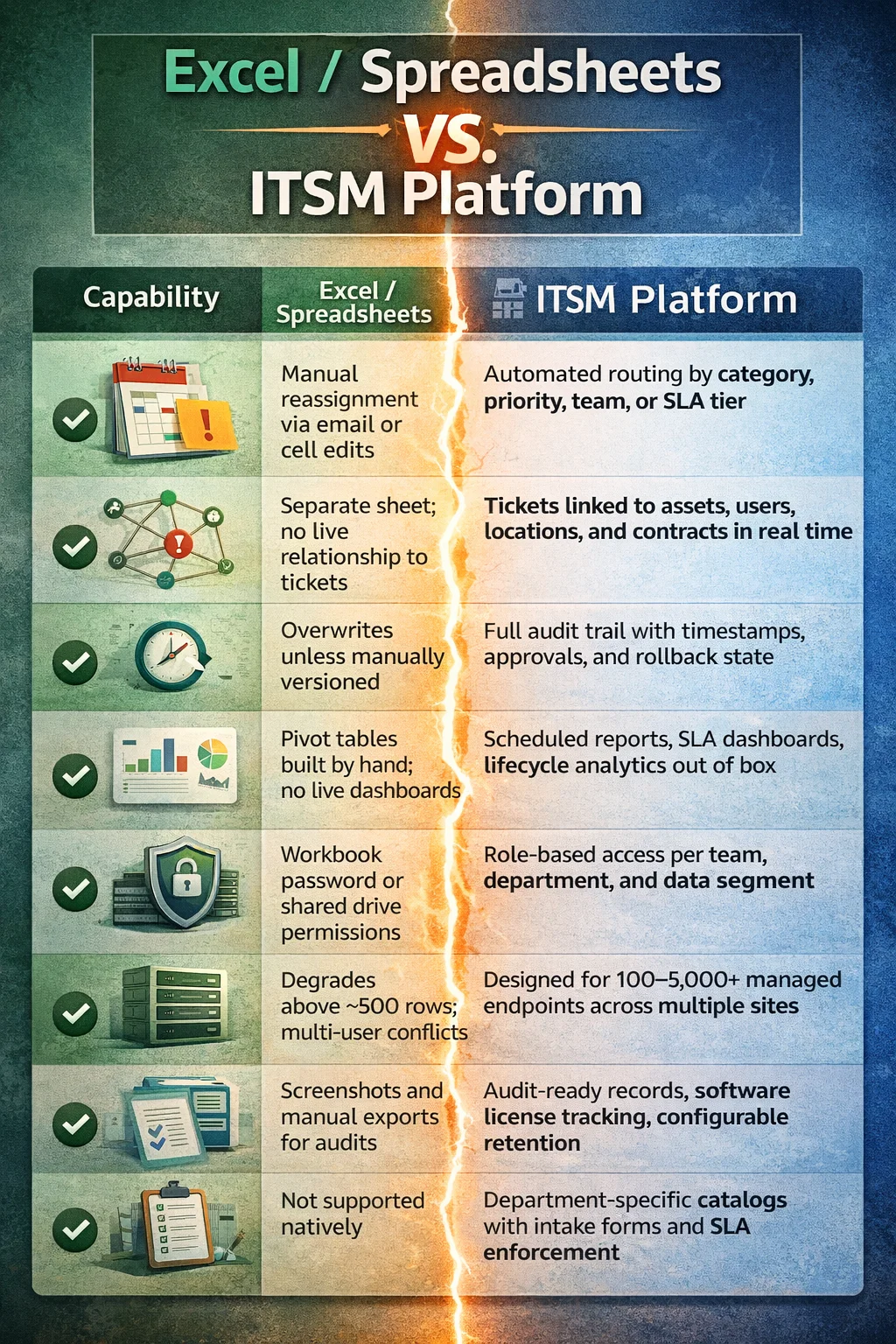
The differences between Excel and ITSM become most visible at the operational level – not in feature marketing, but in the specific failures that emerge as ticket volume, team size, and compliance requirements grow. The table below maps the critical functional areas where the two approaches diverge.
| Capability | Excel / Spreadsheets | ITSM Platform |
| Ticket routing | Manual reassignment via email or cell edits | Automated routing by category, priority, team, or SLA tier |
| Asset linkage | Separate sheet; no live relationship to tickets | Tickets linked to assets, users, locations, and contracts in real time |
| Change history | Overwrites unless manually versioned | Full audit trail with timestamps, approvals, and rollback state |
| Reporting | Pivot tables built by hand; no live dashboards | Scheduled reports, SLA dashboards, lifecycle analytics out of box |
| Access control | Workbook password or shared drive permissions | Role-based access per team, department, and data segment |
| Scalability | Degrades above ~500 rows; multi-user conflicts | Designed for 100–5,000+ managed endpoints across multiple sites |
| Compliance readiness | Screenshots and manual exports for audits | Audit-ready records, software license tracking, configurable retention |
| Service catalog | Not supported natively | Department-specific catalogs with intake forms and SLA enforcement |
Two areas in this comparison deserve special attention because they tend to be underestimated during the Excel phase: asset linkage and compliance readiness.
In Excel, tickets and assets live in separate sheets. When a technician closes a ticket, nothing in the spreadsheet automatically updates the asset’s service history, software state, or assigned user. That disconnect means the organization has no reliable picture of which devices are problem-prone, which software licenses are in use, or how recent changes correlate with incoming requests. In an ITSM platform, those relationships are structural – tickets are created against assets, not alongside them.
Compliance is where the cost of spreadsheets becomes concrete. A hospital facing a HIPAA audit, a public agency subject to data-security legislation, or a manufacturer undergoing an internal review cannot produce reliable audit trails from a shared Excel file. ITSM platforms maintain timestamped change histories, role-based access logs, and software license records that satisfy audit requirements without manual reconstruction.
The Tipping Points: Operational Signs You’ve Outgrown Excel
Ticket volume and missed requests
Excel does not notify anyone of anything. When a request comes in via email, someone has to manually add it to the sheet. When that step is skipped – because the inbox is full, the technician is out, or the email gets buried – the ticket disappears. Teams managing more than 50 requests per month consistently report that manual tracking in spreadsheets leads to duplicate work, missed deadlines, and frustrated end users.
ITSM platforms route requests automatically. A submission through a self-service portal creates a ticket, assigns it by category or rule, and starts an SLA timer without any manual intervention. The human effort shifts from data entry to resolution.
Multi-site and remote environments
A spreadsheet on a shared drive works reasonably well in a single-office environment where everyone can access it. Remote work and multi-site operations break that model. Concurrent edits cause conflicts, VPN-dependent access creates friction, and version control becomes a daily problem. The pandemic period accelerated ITSM adoption significantly among mid-market organizations precisely because remote IT operations exposed the fragility of spreadsheet-based processes.
The asset visibility problem
Most organizations reach the ITSM decision through asset management first, not ticketing. When a device fails and no one can immediately answer what software is installed on it, who it’s assigned to, or when it was last serviced, the cost of that ignorance becomes tangible. ITSM platforms with integrated network discovery provide a live picture of the environment – not a snapshot that’s three weeks out of date because someone forgot to update the spreadsheet.
This sequencing matters for planning purposes. Asset management is typically the first pain point that creates urgency, and organizations that address it often discover that ticketing and change management follow naturally once asset data is centralized and reliable.
Beyond IT: The Enterprise Service Management Dimension
One aspect of the ITSM vs Excel comparison that rarely gets discussed is what happens when non-IT departments start needing service management capabilities. HR, Facilities, Security, and Finance all handle high volumes of operational service requests – onboarding workflows, access requests, maintenance tickets, procurement approvals – and most of them manage those requests through email and spreadsheets.
Enterprise service management (ESM) extends the ITSM model to these departments. The underlying platform is the same, but each department gets its own service catalog, its own intake forms, and – critically – its own data segment. An HR team managing sensitive compensation and personal records cannot share a ticket queue with IT, not because the technology won’t allow it, but because data segregation is a compliance and trust requirement.
This is where platforms like Alloy Software offer structural advantages over spreadsheet-based approaches. Data segmentation at the department level means that HR sees only HR tickets, Facilities sees only Facilities requests, and IT retains administrative oversight without direct access to sensitive records from other teams. That kind of controlled visibility is architecturally impossible in a shared spreadsheet.
ESM is not the right move for every organization. It requires process maturity in the departments you’re expanding into. Rolling ITSM practices into HR or Finance without defined service categories, ownership, and escalation paths will produce a cluttered system rather than an organized one. But for mid-market organizations with multiple service-delivery departments already handling significant request volume, ESM is the logical extension of the platform they’re already running.
The Categorization Problem Nobody Talks About
There is a failure mode in ITSM adoption that doesn’t get enough attention: poor category design. Most organizations, when they first implement an ITSM platform, focus on getting tickets submitted. They replicate whatever loose taxonomy existed in their spreadsheet and call it done. Months later, they find themselves unable to generate meaningful reports because the category structure doesn’t reflect how work actually flows.
Effective service management has three phases: gathering information, managing it, and analyzing it. Most implementations get the first two right and the third wrong. If categories are too granular, technicians ignore them. If they’re too broad, reports are useless. The right structure is the one that allows you to answer the questions leadership will actually ask – volume by department, resolution time by category, recurring issue identification.
This applies equally to the Excel-to-ITSM transition. Migrating your existing spreadsheet columns into a new platform is not implementation – it’s just data entry in a different place. The value of ITSM comes from designing the data model to support analysis, not just storage.
When ITSM Is the Wrong Answer
Not every organization should move from Excel to a full ITSM platform. This deserves honest acknowledgment.
If your team has one technician managing fewer than 100 devices at a single site with no compliance obligations, an ITSM platform adds overhead without proportional return. The configuration burden, the licensing cost, and the discipline required to use it consistently may outweigh the operational benefit for very small, stable environments.
The same caution applies to organizations with immature processes. ITSM platforms formalize and enforce workflows – they do not create them. If your team has no shared definition of what a priority-one ticket is, no agreement on escalation paths, and no ownership model for different request types, implementing an ITSM platform will surface that disorder rather than resolve it. The discipline has to precede the tool, or the tool becomes another thing to manage badly.
ITIL-aligned ITSM is a mid-market to enterprise capability. Organizations below a certain process maturity threshold are better served by getting the fundamentals right – clear ownership, consistent categories, reliable asset records – before adding system complexity.
How to Evaluate the Transition: A Decision Framework
The following signals provide a practical baseline for the Excel vs ITSM decision. None of them is individually decisive, but combinations create clear direction.
| Signal | Stay with Excel | Move to ITSM |
| Team size | 1–2 technicians, single site | 3+ technicians, multi-site or remote workers |
| Ticket volume | Fewer than 50 requests/month | 50+ requests/month with SLA expectations |
| Asset count | Under 100 devices, static inventory | 100+ managed endpoints with change activity |
| Audit / compliance pressure | None; informal internal use | HIPAA, SOC 2, internal audit, or data-security legislation |
| Reporting demands | Ad hoc, occasional | Regular SLA, workload, or lifecycle reports for leadership |
| Multi-department service delivery | IT only | HR, Facilities, Security, Finance also deliver services |
The decision point most organizations miss is the multi-department signal. IT managers often evaluate ITSM purely in terms of their own team’s ticket volume and asset count. But if HR is managing onboarding through email chains, Facilities is tracking maintenance requests in a shared sheet, and Security is logging access requests in a third system, the consolidated case for an ITSM platform – or an ESM extension of one – is much stronger than any single department’s situation suggests.
Implementation: Starting Right
For organizations that have decided to move, the practical question is where to begin. The answer depends on where the most immediate operational pain is located. For most mid-market organizations, that’s asset management – establishing a reliable, live inventory of managed devices before building service workflows on top of it.
Start with a realistic scope. An IT team of four technicians should not attempt to implement change management, ESM expansion, and full CMDB population in the first ninety days. Getting tickets flowing, assets linked, and basic reporting working is a meaningful first milestone. Complexity can be added incrementally once the team has confidence in the core workflows.
Staffing is a common concern at this stage. Most mid-market organizations do not need a dedicated ITSM manager to run a successful implementation. What they need is one senior technician who owns the configuration and a team willing to use the system consistently. Training existing staff is almost always more effective than hiring for this role, unless the organization is expanding into ful lenterprise service management across multiple departments simultaneously.
One structural decision matters early: category design. Resist the impulse to replicate your existing spreadsheet taxonomy. Work backward from the questions you need to answer at the end of the quarter – resolution time by team, ticket volume by department, most common hardware failure types – and build categories that make those reports possible from day one.
The Reporting Gap That Forces the Transition
In practice, many organizations stay on Excel longer than they should because reporting pain accumulates slowly. No single missed SLA or duplicate ticket triggers an immediate platform evaluation. The forcing function is usually external: an audit, a leadership request for data that can’t be produced cleanly, or a compliance deadline that makes the inadequacy of spreadsheet records visible.
ITSM platforms convert operational data into leadership-ready reporting automatically. SLA compliance, technician workload, open ticket aging, asset lifecycle status – these reports exist and update continuously without anyone rebuilding a pivot table. For IT managers who spend meaningful time each month preparing manual reports, that alone often justifies the transition.
Bottom Line
Excel is a reasonable starting point for IT management. It is not a destination. The gap between what spreadsheets can do and what a growing IT environment requires grows predictably with team size, ticket volume, asset count, and compliance pressure.
The Excel vs ITSM comparison is ultimately not about features – it’s about whether your current tooling can answer the operational questions your organization will ask in six months. If the honest answer is no, the transition conversation is already overdue.
The organizations that navigate this transition well are the ones that evaluate their process maturity before evaluating software, design their data model around reporting requirements rather than existing habits, and scope their initial implementation to deliver quick operational wins before expanding into more complex capabilities. Platforms that are configurable enough to match your workflow – rather than requiring you to match theirs – are the ones that tend to stay in service for a decade rather than becoming the next system you need to replace.