Studying isn’t always easy, is it? One day you’re trying to understand a difficult chapter, the next you’re preparing a presentation, researching an assignment, or revising for an exam.
But here’s something useful: AI tools can make studying more manageable!
Today, students can use artificial intelligence to understand complicated topics, organize notes, improve their writing, and prepare for exams. Many tools even offer free versions.
So, which ones are actually worth trying?
Let’s explore five useful AI tools for students in 2026, what they do, and how you can use them in everyday student life.
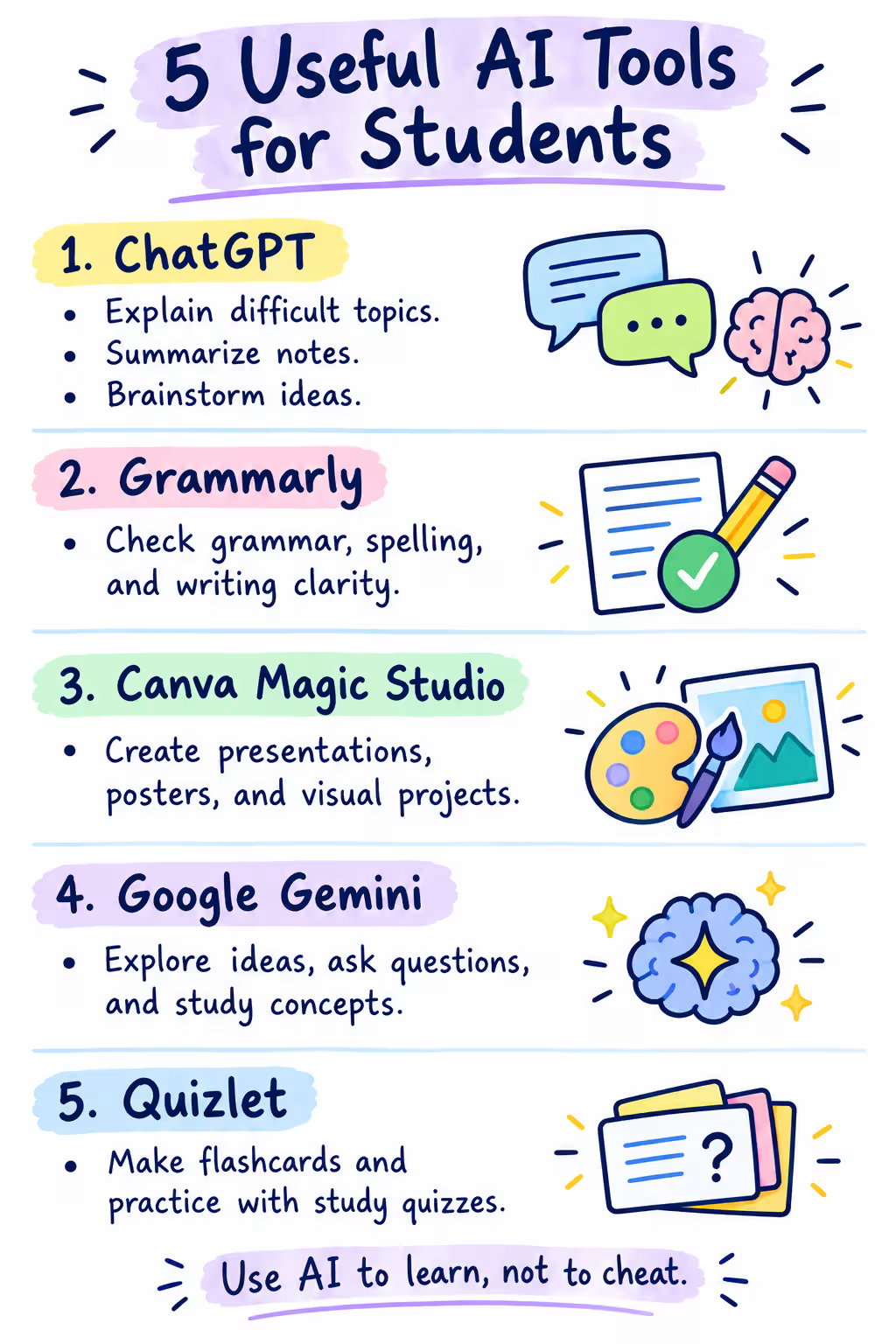
Quick Comparison of the 5 Best AI Tools for Students
| AI Tool | Best For | Free Plan |
|---|---|---|
| ChatGPT | Learning and homework guidance | Yes |
| Gemini Notebook | Notes and exam preparation | Yes |
| Perplexity AI | Research with sources | Yes |
| Grammarly | Grammar and writing improvement | Yes |
| Canva AI | Presentations and creative projects | Limited AI features |
All five offer a way to get started without immediately purchasing a subscription. However, free features and usage limits differ.
1. ChatGPT – Your Personal AI Study Assistant
Imagine you’re studying mathematics, but one particular question just doesn’t make sense. You’ve read the explanation several times, yet you’re still confused.
That’s where ChatGPT can help!
Developed by OpenAI, ChatGPT is a conversational AI assistant that explains topics, answers questions, and helps students practice what they’ve learned.
One especially useful feature is Study Mode. Instead of simply providing answers, it can guide you through problems with questions and step-by-step explanations.
What can students do with ChatGPT?
- Understand difficult concepts using simple examples.
- Practice mathematics, science, and programming.
- Create revision questions before examinations.
- Improve their understanding of class notes.
Try this prompt:
“Explain photosynthesis in simple English for a 10th-grade student. Use one real-life example, then ask me three questions to check my understanding.”
Free or paid? ChatGPT offers a free plan, including Study Mode. Paid plans provide additional capabilities and higher usage limits.
One limitation: ChatGPT can make mistakes, especially with calculations, facts, and references. Always check important answers against reliable learning materials.
2. Gemini Notebook – Turn Your Notes Into Study Materials
Have you ever opened a 50-page PDF just before an exam and wondered where to begin?
Gemini Notebook, previously called NotebookLM, is designed for situations like this.
Developed by Google, it lets you upload study materials, including PDFs, documents, and supported web pages. You can then ask questions about those materials instead of searching through every page manually.
It can also generate study guides, flashcards, quizzes, and audio overviews based on your sources.
Here’s a practical example:
Suppose you have three chapters of biology notes.
- Upload the chapters into a notebook.
- Ask for a summary of the important concepts.
- Generate practice questions or flashcards.
- Review the original passages whenever you need clarification.
Try this prompt:
“Create 15 exam revision questions from my uploaded biology notes. Include short explanations, and identify the topics I should revise again.”
Free or paid? A free version is available with daily usage limits. Additional capacity and selected advanced features require paid plans.
One limitation: Even source-based summaries can overlook details or misinterpret information. Check important points against your original notes.
3. Perplexity AI – Research Topics With Sources
Researching an assignment often means opening several websites, reading articles, and finding trustworthy information.
Wouldn’t it be easier to start with an organized explanation that also shows its sources?
That’s what Perplexity AI is designed to provide.
Perplexity is an AI-powered search and answer tool. When you ask a research question, it can search the web, summarize relevant information, and display links to supporting sources.
This makes it particularly helpful when you’re exploring a new topic.
Students can use Perplexity to:
- Discover information for assignments.
- Find articles about science and technology.
- Compare different explanations of a topic.
- Locate sources for further reading.
Try this prompt:
“Explain how renewable energy affects the environment. Include reliable sources, recent examples, and three advantages and disadvantages.”
Free or paid? Basic search is free, while advanced research capabilities and higher limits are available through paid plans.
One limitation: A citation doesn’t automatically prove an answer is correct! Open the linked sources, check what they actually say, and use the original publications when referencing information in academic work.
4. Grammarly – Improve Your English Writing
Writing an assignment is one thing. Making sure it’s clear, grammatically correct, and easy to read is another!
Small errors can sometimes change the meaning of a sentence.
Grammarly is an AI-powered writing assistant that helps identify spelling, grammar, and punctuation mistakes. It can also provide feedback about how your writing sounds.
For students who regularly prepare essays, reports, or emails in English, this can be particularly useful.
For example:
You write: “He don’t understand the question.”
Grammarly can suggest: “He doesn’t understand the question.”
The correction is simple, but understanding why it’s necessary helps improve your English.
How can students use it?
Write your first draft independently. Then use Grammarly to review mistakes, evaluate suggestions, and improve the final version.
Free or paid? The free plan includes basic writing corrections and tone detection. Advanced rewriting and additional writing tools are available with Grammarly Pro.
One limitation: Not every suggested change is necessary. Review corrections yourself, particularly when writing technical or academic content.
5. Canva AI – Create Presentations and Visual Projects
Not every school assignment involves writing!
Sometimes you need a presentation, infographic, poster, or educational diagram. And let’s be realistic—not everyone is comfortable with graphic design.
Canva makes visual projects easier through ready-made templates, design tools, and AI-assisted features.
Students can use it to organize information visually and create attractive classroom presentations.
For example:
Imagine your teacher asks for a presentation about climate change.
You could use Canva to choose a presentation template, organize your main points, add charts, and create visually consistent slides.
Where available, its AI features can also help brainstorm text or generate design elements.
Try this prompt in an available Canva AI feature:
“Create a simple educational presentation outline about climate change for high school students. Include causes, effects, and practical solutions.”
Free or paid? Canva has a free plan, but AI usage is limited and some features require payment. Canva for Education provides additional benefits to eligible K–12 schools and students; it is not generally available to university students.
One limitation: AI-generated text and visuals still need checking. Verify factual information and make sure the design follows your teacher’s instructions.
How to Choose the Right AI Tool for Studying
You probably don’t need all five tools every day.
The better approach? Choose the tool that matches your task.
For example, use ChatGPT when you don’t understand a concept. Choose Gemini Notebook when you need to revise your own lecture materials, or Perplexity when you want to explore a topic through published sources.
Grammarly is useful when polishing your writing, while Canva works well for visual assignments.
You can also combine them! Research a topic with Perplexity, understand difficult ideas with ChatGPT, write your own explanation, check the grammar, and finally create a presentation in Canva.
How to Use AI Tools Responsibly as a Student
AI can support learning, but it shouldn’t replace it.
Copying an AI-generated assignment without understanding the subject might save time today, but it won’t help much during an exam.
A few habits make a difference:
- Think first: Try solving a problem yourself before asking AI.
- Verify information: Check answers against textbooks and reliable sources.
- Follow academic rules: Make sure your school or teacher permits the way you’re using AI.
- Protect your privacy: Avoid uploading passwords, personal records, or confidential school materials.
Remember, the goal isn’t simply to finish your homework faster. It’s to understand what you’re studying.
Frequently Asked Questions
Are AI tools free for students?
Yes! ChatGPT, Gemini Notebook, Perplexity, Grammarly, and Canva all offer free access to certain features. Some advanced tools have paid subscriptions or usage limits.
Which AI tool is best for exam preparation?
ChatGPT Study Mode is useful for interactive practice, while Gemini Notebook is particularly helpful for creating quizzes and reviewing uploaded study materials.
Can students use AI to complete homework?
AI can help explain questions, provide hints, and review your work. However, submitting AI-generated answers may violate your school’s academic-integrity rules. Always check your teacher’s instructions.